When using the standard warehouse locations data entity, I kept getting an error that the "Field WarehouseAisleId must be filled in."
This is odd because the wmslocation table, the entity and the staging table all have the Mandatory property set to "No" for this field.
While investigating, I found that in the WhsLocationBuild class, "createNewLocation()" method, the system sets wmsLocation.aisleid to '--' (yes, it's hard-coded, sigh).
Also, the data entity specifically checks that the field is filled in during the validateWrite() method. To get around this, I added:
'--' as WarehouseAisleId
to my script that exports the data out of my legacy application.
Hope this helps!
Friday, October 18, 2019


Tuesday, October 8, 2019
D365: getting a drop-down/lookup for a new field on a table
So you have a new table that you want to associate with InventLocation. You create the table and add a field to the table. Let's call it TestTable and the field is GroupId. Now you want to add groupId to the inventLocation table and add it to the inventLocation (warehouse) form and get the drop down to show all the groupIds in the TestTable to choose from.
In TestTable, create an index with your GroupId field in it. It should not allow duplicates and it should be used as the primary and clustered index of your table.
Now go to the InventLocation table and create a new relation, choose foreign key relation as the type of relation you are adding. The related table should be TestTable and then choose your index that you created as well.
Once you save this, it will add a field to InventLocation for you and will also create an Index for you. If you want to allow duplicates in InventLocation, you will have to go to the index it created and set allowDuplicates to Yes. You can delete the index if you don't want it though.
That's it!
In TestTable, create an index with your GroupId field in it. It should not allow duplicates and it should be used as the primary and clustered index of your table.
Now go to the InventLocation table and create a new relation, choose foreign key relation as the type of relation you are adding. The related table should be TestTable and then choose your index that you created as well.
Once you save this, it will add a field to InventLocation for you and will also create an Index for you. If you want to allow duplicates in InventLocation, you will have to go to the index it created and set allowDuplicates to Yes. You can delete the index if you don't want it though.
That's it!
Wednesday, September 18, 2019
D365: Menu item cannot be opened
I was getting an error on my dimension group forms (Product Information Management > Dimension and variant groups > [Dimension name] group) that said the menu items could not be opened.
In the background there was also this little message saying that the system language was not set. This was happening in a Dev environment using the DAT company/legal entity.
I did a full DB sync and still got the errors. I ended up going to fill in the system language because the pop up was annoying me and that fixed the issue with the menu items.
The setting is under System Administration > Setup > System parameters.
Hope this helps!
In the background there was also this little message saying that the system language was not set. This was happening in a Dev environment using the DAT company/legal entity.
I did a full DB sync and still got the errors. I ended up going to fill in the system language because the pop up was annoying me and that fixed the issue with the menu items.
The setting is under System Administration > Setup > System parameters.
Hope this helps!
Wednesday, September 4, 2019
Dynamics 365: Printing two reports (a docentric and ssrs report) at the same time
I was tasked with creating a "master bill of lading" report that was very similar to the bill of lading report (wmsbilloflading) with only design changes. I decided to use Docentric instead of using SSRS (which the standard wmsbilloflading uses).
There was also a requirement that when the master bill of lading was printed that all the children bill of ladings should be printed as well.
I created my own controller class to handle the reports (it extends WmsBillofLadingController). Both the bill of lading and master used the same controller class. The "print" button on the bill of lading form triggered this controller class (main method).


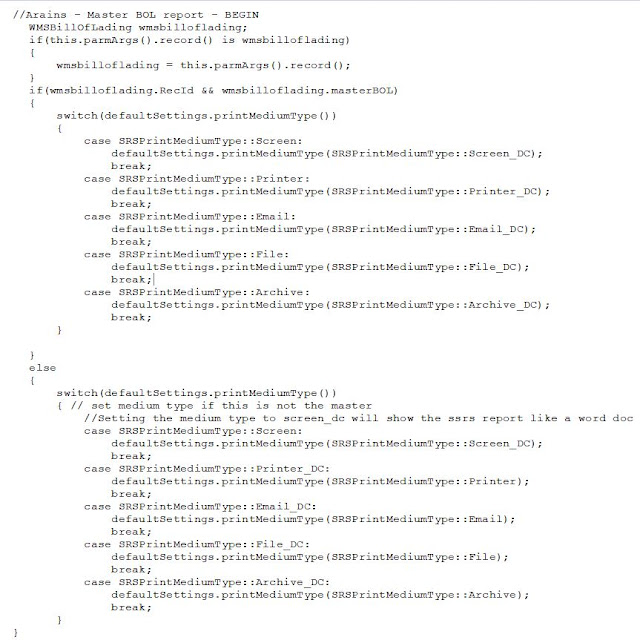
In the newFromArgs() method of my controller, I determined if I was printing the master bol or a standard bol based on the args().record() passed in. If the masterbol flag is on, then I needed to setup the master report; otherwise, setup the standard report:


There was also a requirement that when the master bill of lading was printed that all the children bill of ladings should be printed as well.
I created my own controller class to handle the reports (it extends WmsBillofLadingController). Both the bill of lading and master used the same controller class. The "print" button on the bill of lading form triggered this controller class (main method).
I created a new PrintMgmtDocumentType for my new report. Because of that, I had to add code to the initPrintMgmtReportRun() method to construct the correct printMgmtReportRun class for my new document type.

I also had to write a handler class for other print management methods that needed handled:


The startOperation() method will call back into the main() method for subsequent calls to the bill of lading report. It uses the parmArgs() to pass in the new wmsbilloflading record() to print and it uses parm to tell it if we are printing a child or the master record as if it were a child and the parmObject contains the printSettings. We have to pass the printSettings() to the children since we suppress the dialog.
The startOperation() method is where the report Dialog and then report are actually called from the super() method. This is where you can catch it to display multiple reports at once.

There is an issue specific to the master being a docentric report and the children being SSRS reports. After the SSRS reports run and you go to run the Docentric master report again, the print medium now shows "screen" instead of "Docentric screen." So that the user didn't have to keep changing that, I had to add code in the loadPrintSettings() method of the controller so that if it comes in as a master and the screen type is screen, change it to screen_dc. Also, if it is not a master and it comes in as Docentric, I change it to a regular print medium type UNLESS it is screen. If it comes in as Screen, I always want it to print as Docentric screen medium type because it prints out much better to a printer than a SSRS does.

Let me know if you have any questions.
Happy coding!
Thursday, August 1, 2019
Dynamics 365 - Breakpoint will not be hit. Symbols have not been loaded. . .
I looked all around for a resolution to this problem and everyone pointed to the same setting.
Under Dynamics 365 > Options :
Make sure under the Dynamics 365 > Debugging section, make sure that "Load symbols only for items in the solution" is NOT checked.
So I did that, but still continued to get this error when attempting to debug.
There is another setting that you need to check.
It is in VS under Tools > Options. Go to the Debugging > Symbols section and make sure that Automatically load symbols for :
"All modules, unless excluded" is selected!
Under Dynamics 365 > Options :
Make sure under the Dynamics 365 > Debugging section, make sure that "Load symbols only for items in the solution" is NOT checked.
So I did that, but still continued to get this error when attempting to debug.
There is another setting that you need to check.
It is in VS under Tools > Options. Go to the Debugging > Symbols section and make sure that Automatically load symbols for :
"All modules, unless excluded" is selected!
Friday, May 4, 2018
AX 2012: Adding a field to PurchLine and the PO confirmation report
This was my first AX 2012 SSRS customization and I think it was one of the harder ones. Here is everything I had to do to get this to work.
1) Add fields to purchLine table
2) Add fields to purchPurchaseOrderTmp table - this is used by the PurchPurchaseOrder report
3) Add fields to purchLineHistory table - this is used by the PurchLineArchivedVersions View and Query
4) Update PurchLineArchivedVersions view - drag the new field from the PurchLineHistory datasource into the Fields node of the view. Compile the view.
5) Update PurchLineNotArchivedVersions view - drag the new field from the PurchLine datasource into the Fields node of the view. Compile the view.
6) Compile the PurchLineAllVersions view and Synchronize. The field should be available in the PurchLineArchivedVersions and PurchLineNotArchivedVersions datasources on this view. Drag the new field from the PurchLineArchivedVersions view into the Fields node of the PurchLineAllVersions view. Compile this view.
7) Go to the PurchLineAllVersions QUERY now. You have to manually add the new field to the PurchLineArchivedVersions and PurchLineNotArchivedVersions datasources of this query because the dynamic fields property is set to No. Steps 3-7 are all being done because the PurchPurchaseOrderDP (data provider) class uses the PurchLineAllVersions view to copy data to the tmp table, so you need your new field there for step 8.
8) Modify the setPurchPurchaseOrderDetails() method on the PurchPurchaseOrderDP class and add code there to copy your field from PurchLineAllVersions to the PurchPurchaseOrderTmp table. It will look something like:
purchPurchaseOrderTmp.NewField = purchLineAllVersions.NewField;
Now you have to modify the report in visual studio. This was tricky. When I tried to refresh the dataset of the report to see my new fields I got some errors about a parameter on the report. It said Element:PurchPurchaseOrder.Parameters.IsPurchConfirmationRequestJournal has already been defined.
I ended up having to delete the Report parameter (isPurchConfirmationRequestJournal) on the report in Visual studio and refresh the datasets. Refreshing the datasets recreated the report parameter properly.
Hope this helps!
1) Add fields to purchLine table
2) Add fields to purchPurchaseOrderTmp table - this is used by the PurchPurchaseOrder report
3) Add fields to purchLineHistory table - this is used by the PurchLineArchivedVersions View and Query
4) Update PurchLineArchivedVersions view - drag the new field from the PurchLineHistory datasource into the Fields node of the view. Compile the view.
5) Update PurchLineNotArchivedVersions view - drag the new field from the PurchLine datasource into the Fields node of the view. Compile the view.
6) Compile the PurchLineAllVersions view and Synchronize. The field should be available in the PurchLineArchivedVersions and PurchLineNotArchivedVersions datasources on this view. Drag the new field from the PurchLineArchivedVersions view into the Fields node of the PurchLineAllVersions view. Compile this view.
7) Go to the PurchLineAllVersions QUERY now. You have to manually add the new field to the PurchLineArchivedVersions and PurchLineNotArchivedVersions datasources of this query because the dynamic fields property is set to No. Steps 3-7 are all being done because the PurchPurchaseOrderDP (data provider) class uses the PurchLineAllVersions view to copy data to the tmp table, so you need your new field there for step 8.
8) Modify the setPurchPurchaseOrderDetails() method on the PurchPurchaseOrderDP class and add code there to copy your field from PurchLineAllVersions to the PurchPurchaseOrderTmp table. It will look something like:
purchPurchaseOrderTmp.NewField = purchLineAllVersions.NewField;
Now you have to modify the report in visual studio. This was tricky. When I tried to refresh the dataset of the report to see my new fields I got some errors about a parameter on the report. It said Element:PurchPurchaseOrder.Parameters.IsPurchConfirmationRequestJournal has already been defined.
I ended up having to delete the Report parameter (isPurchConfirmationRequestJournal) on the report in Visual studio and refresh the datasets. Refreshing the datasets recreated the report parameter properly.
Hope this helps!
Wednesday, July 8, 2015
Allowing the value of 0.00 on a form for a mandatory field that is variable type Real
As you know, the null value in the database for a real number is 0.0. If you have a form where you have this field marked mandatory and want to allow 0.0 this causes issues because the form reads the 0.0 in as null and gives you the error "Field 'X' must be filled in." You will receive this error before it even hits any of your validation code to determine if 0.0 is actually a valid value for that field.
Here is how I got around this. In the validate() method on the control (it has to be at the control level - if you also want it on the datasource, you can add it there too) I commented out the super() and just allowed it to return true (you can also call your own validateField() method here if you like). My field happened to have an edit method, so in the edit method I called validateField() and modifiedField() on the table. When modifiedField() returned, I checked the value of my field, if it returned from validate/modified successfully and it was still 0, then I set the showZero() property of the control on the form to true. This shows the user the 0 that they entered. Remember to set your control AutoDeclaration property to Yes so that you can use the field control in the code easily.
edit Field editField(boolean _set, Field _edtField)
{
;
if (_set)
{
Table.Field = _edtField;
if (Table.validateField(fieldNum(Table,Field)))
{
Table.modifiedField(fieldNum(Table, Field));
edtField = _edtField; // edtField is a global variable on the form
if(edtField == 0.0)
{
Field_Control.showZero(true);
}
}
}
return edtField;
}
Here is how I got around this. In the validate() method on the control (it has to be at the control level - if you also want it on the datasource, you can add it there too) I commented out the super() and just allowed it to return true (you can also call your own validateField() method here if you like). My field happened to have an edit method, so in the edit method I called validateField() and modifiedField() on the table. When modifiedField() returned, I checked the value of my field, if it returned from validate/modified successfully and it was still 0, then I set the showZero() property of the control on the form to true. This shows the user the 0 that they entered. Remember to set your control AutoDeclaration property to Yes so that you can use the field control in the code easily.
edit Field editField(boolean _set, Field _edtField)
{
;
if (_set)
{
Table.Field = _edtField;
if (Table.validateField(fieldNum(Table,Field)))
{
Table.modifiedField(fieldNum(Table, Field));
edtField = _edtField; // edtField is a global variable on the form
if(edtField == 0.0)
{
Field_Control.showZero(true);
}
}
}
return edtField;
}
Filter controls on a form with user initiated filters
I added filters to the standard work order form in Dynamics AX. They are checkboxes for what status the user would like to filter. However, if a user filtered their own fields using the filtering grid (CTRL-G) and then they checked or unchecked a status box, their user filters would disappear and the form would reset using the checkbox filters.
Here is how I fixed this:
Set the initial ProdStatus filter using the usage data of the user for the original checkboxes that will be used. Do this in the init() method of the form after getting the usage data and setting the controls.
xSysLastValue::getLast(this);
StatusCreated.value(bStatusCreated);
StatusCostEstimated.value(bStatusCostEstimated);
StatusScheduled.value(bStatusScheduled);
StatusReleased.value(bStatusReleased);
StatusStartedUp.value(bStatusStartedUp);
StatusReportedFinished.value(bStatusReportedFinished);
StatusCompleted.value(bStatusCompleted);
For each status, add it to the status string field you are building:
if (bStatusCreated)
{
if (!strLen(statusFilter))
{
statusFilter += int2str(enum2int(ProdStatus::Created));
}
else
{
statusFilter += ',' + int2str(enum2int(ProdStatus::Created));
}
} . . .
Then set your query range:
qbrStatus = this.query().dataSourceTable(tablenum(ProdTable)).addRange(fieldnum
(ProdTable, ProdStatus));
if (strLen(statusFilter))
{
qbrStatus.status(RangeStatus::Hidden);
qbrStatus.value(statusFilter);
}
else
{
qbrStatus.value(SysQuery::valueUnlimited());
}
In the modified method of the checkbox status controls, retrieve the prodTable_ds.queryRun().query() and then modify it with your current status checkbox. Then call ProdTable_DS.research(). Calling executeQuery() again was what was resetting the form to the original query. Using research() will keep all the user filters the same.
str statusFilter;
Query queryProdTable;
QueryBuildDatasource qbdsProdTable;
;
if (!ProdTable_DS.queryRun()) // just in case
{
return;
}
queryProdTable = ProdTable_DS.queryRun().query();
qbdsProdTable = queryProdTable.dataSourceTable(tableNum(ProdTable));
Just like in the init() method, for each status, add it to the statusFilter string and then set your status. This new qbrStatus is using the the query from queryRun() though so it will maintain user filters. Calling research() on the datasource will run this filtered query on your form.
qbrStatus = SysQuery::findOrCreateRange(qbdsProdTable, fieldNum(ProdTable, ProdStatus));
qbrStatus.status(RangeStatus::Hidden);
qbrStatus.value(statusFilter);
ProdTable_DS.research();
Here is how I fixed this:
Set the initial ProdStatus filter using the usage data of the user for the original checkboxes that will be used. Do this in the init() method of the form after getting the usage data and setting the controls.
xSysLastValue::getLast(this);
StatusCreated.value(bStatusCreated);
StatusCostEstimated.value(bStatusCostEstimated);
StatusScheduled.value(bStatusScheduled);
StatusReleased.value(bStatusReleased);
StatusStartedUp.value(bStatusStartedUp);
StatusReportedFinished.value(bStatusReportedFinished);
StatusCompleted.value(bStatusCompleted);
For each status, add it to the status string field you are building:
if (bStatusCreated)
{
if (!strLen(statusFilter))
{
statusFilter += int2str(enum2int(ProdStatus::Created));
}
else
{
statusFilter += ',' + int2str(enum2int(ProdStatus::Created));
}
} . . .
Then set your query range:
qbrStatus = this.query().dataSourceTable(tablenum(ProdTable)).addRange(fieldnum
(ProdTable, ProdStatus));
if (strLen(statusFilter))
{
qbrStatus.status(RangeStatus::Hidden);
qbrStatus.value(statusFilter);
}
else
{
qbrStatus.value(SysQuery::valueUnlimited());
}
In the modified method of the checkbox status controls, retrieve the prodTable_ds.queryRun().query() and then modify it with your current status checkbox. Then call ProdTable_DS.research(). Calling executeQuery() again was what was resetting the form to the original query. Using research() will keep all the user filters the same.
str statusFilter;
Query queryProdTable;
QueryBuildDatasource qbdsProdTable;
;
if (!ProdTable_DS.queryRun()) // just in case
{
return;
}
queryProdTable = ProdTable_DS.queryRun().query();
qbdsProdTable = queryProdTable.dataSourceTable(tableNum(ProdTable));
Just like in the init() method, for each status, add it to the statusFilter string and then set your status. This new qbrStatus is using the the query from queryRun() though so it will maintain user filters. Calling research() on the datasource will run this filtered query on your form.
qbrStatus = SysQuery::findOrCreateRange(qbdsProdTable, fieldNum(ProdTable, ProdStatus));
qbrStatus.status(RangeStatus::Hidden);
qbrStatus.value(statusFilter);
ProdTable_DS.research();
Thursday, September 6, 2012
Production order status reset (from code vs. form)
Recently I had the need to change the status of an order back to "Created" programmatically. I found lots of blogs about how to go forward with the status, but going back was hard to find. Here's what I ended up doing. I wrote a class with 3 methods. A classdeclaration() with a prodid variable (used below), a parmProdId method and the following method:
boolean resetStatusToCreated
{
ProdMultiStatusDecrease prodMultiStatusDecrease;
ProdParmStatusDecrease prodParmStatusDecrease;
ProdTable prodTable;
Args args = new Args();
;
select prodTable where prodTable.ProdId == prodID;
args.record(prodTable);
prodParmStatusDecrease.clear();
prodParmStatusDecrease.initFromProdTable(prodTable);
prodParmStatusDecrease.WantedStatus = ProdStatus::Created;
prodParmStatusDecrease.ParmId = NumberSeq::newGetNum(CompanyInfo::numRefParmId()).num();
prodParmStatusDecrease.insert();
prodMultiStatusDecrease = prodMultiStatusDecrease::construct(args);
prodMultiStatusDecrease.initParmBuffer(prodParmStatusDecrease);
prodMultiStatusDecrease.parmId(prodParmStatusDecrease.ParmId);
prodMultiStatusDecrease.run();
select prodTable where prodTable.ProdId == prodId;
if(prodTable.ProdStatus == prodStatus::Created)
{
return true;
}
return false;
It seems to have worked. I just have to verify that everything was reversed properly. Testing the code is as easy as doing this:
ResetProdStatusClass = new ResetClass();
ResetProdStatusClass.parmProdId('WO000001');
ResetProdStatusClass.resetStatusToCreated();
I specifically needed to take it back to the Created status, but I imagine you could modify this to pass in the status you wanted it reset to and set it in the WantedStatus field.
Good luck!
boolean resetStatusToCreated
{
ProdMultiStatusDecrease prodMultiStatusDecrease;
ProdParmStatusDecrease prodParmStatusDecrease;
ProdTable prodTable;
Args args = new Args();
;
select prodTable where prodTable.ProdId == prodID;
args.record(prodTable);
prodParmStatusDecrease.clear();
prodParmStatusDecrease.initFromProdTable(prodTable);
prodParmStatusDecrease.WantedStatus = ProdStatus::Created;
prodParmStatusDecrease.ParmId = NumberSeq::newGetNum(CompanyInfo::numRefParmId()).num();
prodParmStatusDecrease.insert();
prodMultiStatusDecrease = prodMultiStatusDecrease::construct(args);
prodMultiStatusDecrease.initParmBuffer(prodParmStatusDecrease);
prodMultiStatusDecrease.parmId(prodParmStatusDecrease.ParmId);
prodMultiStatusDecrease.run();
select prodTable where prodTable.ProdId == prodId;
if(prodTable.ProdStatus == prodStatus::Created)
{
return true;
}
return false;
It seems to have worked. I just have to verify that everything was reversed properly. Testing the code is as easy as doing this:
ResetProdStatusClass = new ResetClass();
ResetProdStatusClass.parmProdId('WO000001');
ResetProdStatusClass.resetStatusToCreated();
I specifically needed to take it back to the Created status, but I imagine you could modify this to pass in the status you wanted it reset to and set it in the WantedStatus field.
Good luck!
Wednesday, August 15, 2012
Using containers vs. other collection classes
I’ve
seen containers used on some forms, so I thought this would be useful
information.
This is based on my experience and some sites I’ve read (which I’ve given links to below).
This is based on my experience and some sites I’ve read (which I’ve given links to below).
If
you’re going to store recIds as your datatype in any of these collection
classes and you're not on AX 2012 yet, you should
define the type like this (because AX 2012 handles recIds differently, it
will be easier
for upgrading when you do this):
Declare
a dictype variable like this:
DictType dt = new DictType(extendedTypeNum(recid));
DictType dt = new DictType(extendedTypeNum(recid));
Then
use it like this, here are examples for a map and a set:
msgMap = new Map(dt.baseType(),Types::String);
msgMap = new Map(dt.baseType(),Types::String);
setRecIds
= new Set(dt.baseType());
Containers:
Containers are dynamic and have no limits. They can contain elements of almost all data types: boolean, integer, real, date, string, container, arrays, tables, and extended data types. However, objects may not be stored in containers.Containers in AX are used very often. It’s easy to work with them, but
data in containers are stored sequentially, and retrieved sequentially. This means that containers provide slower data access if you are working with a large numbers of records. You cannot modify a container in-place, instead each addition or deletion has to iterate over the entire structure to copy all values into a newly allocated one. So every container manipulation has a run time of O(n). This is why they are not recommended to be used on forms. This site has some good information about how to use containers more efficiently when you do need to use them http://www.axaptapedia.com/index.php?title=Container If you are storing unique data of one type (like storing recids for a checkbox on a form),you can use a Set (see below). If you are storing non-unique data of the same type, use a List (see below).
Maps are most useful if you need a key for your data. I used a map recently to store the recId as a key to save/retrieve the inventTransId of some records. This is a good explanation of how to use Maps (http://www.axaptapedia.com/index.php?title=Map_Class)
Sets:
Sets are an unordered list of items. If you try to add something to a set that is already in the set, it will ignore it. Sets have an in() and remove() method which is useful. This is a good explanation of how to use Sets http://www.axaptapedia.com/index.php?title=Set_Class
Lists:
Lists contain elements that are accessed sequentially. Lists provide getEnumerator() and getIterator() methods (like sets do) which allow you to insert and delete items from the list. Here’s some information about Lists http://msdn.microsoft.com/en-us/library/aa848905%28v=ax.10%29.aspx.
Subscribe to:
Posts (Atom)